Adjusting Time Off Balances for your Team
Last updated: January 1, 2026
Niural gives administrators the flexibility to update time off balances when standard accrual logic doesn’t apply. Whether you're correcting errors, making exceptions, or issuing one-time leave grants, you can adjust balances for individuals or groups as needed.
When to Adjust Time Off Balances
Manual balance adjustments are typically used in the following cases:
Correcting errors in previous accruals
Providing extra time off as a discretionary benefit
Reinstating time off following changes to a leave policy
Managing partial-year entries, such as mid-cycle hires or terminations
How to Make Adjustments
1. Adjusting an Individual Member’s Balance
To modify time off for a single employee or contractor:
Navigate to People > Time Off > [Select Policy]
Find the member whose balance you want to update
Choose Adjust Balance
Enter the updated balance amount (increase or decrease)
Add a required reason for the adjustment
Click Submit to save the change
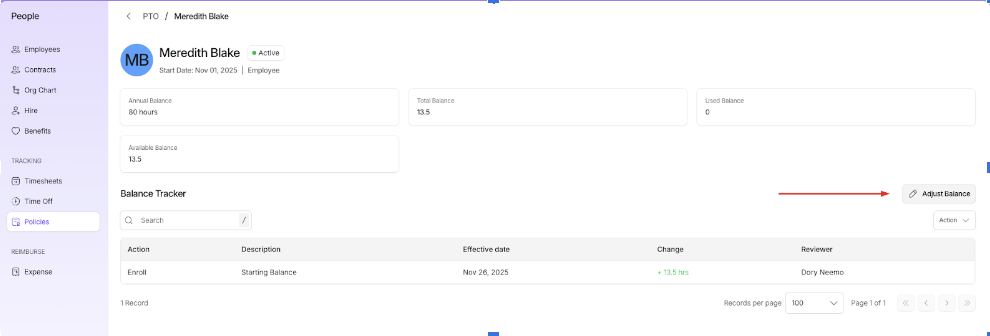
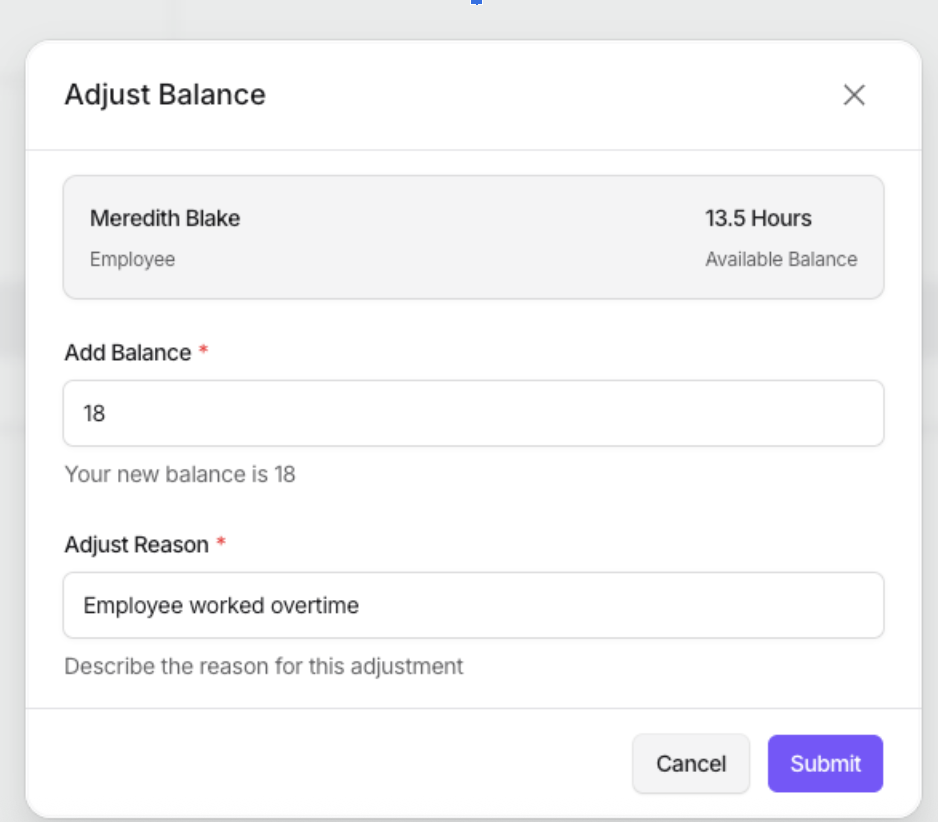
Note: The updated balance reflects immediately and applies to new leave requests.
2. Adjusting Balances for Multiple Members
To make updates for several members at once:
Use the checkboxes to select multiple people from the policy view
Click Adjust Balance
Specify the new balance for each selected member
Enter a shared reason for the adjustment
Click Submit to apply the changes
This is useful for team-wide leave grants or onboarding corrections across departments.
Impact of Adjustments
Changes apply only to available balances.
They do not alter underlying accrual schedules, future entitlements, or policy settings.
Adjustments are logged for audit purposes and visible to authorized admins.
Best Practices
Use adjustments selectively, for cases not covered by your time off policy.
Always provide a clear explanation for any manual change.
Review individual leave history before applying large or bulk edits.
Notify impacted employees when balances are updated.z
Frequently Asked Questions
Q: Can I reduce someone’s balance below 0?
Yes, as long as your policy permits negative balances, Niural will accept a deduction that results in a negative total.
Q: Will adjustments affect payroll?
No. Adjustments apply only to time off tracking. Any related payroll calculations must be handled separately.
Q: Can I reverse an adjustment?
Adjustments cannot be reversed directly. To correct a previous update, submit a new adjustment that offsets the change, and include an explanatory note.